CreatorDB Product Updates & Release Notes
Track the latest platform improvements, new features, and bug fixes from our 2026 product releases. Stay updated on CreatorDB enhancements.
At CreatorDB, we’re committed to transparency and continuous improvement. Our Product Updates & Release Notes share the latest feature updates, enhancements, and fixes we’ve made to deliver a better experience for you.
Have feedback? We’d love to hear from you at hello@creatordb.app.
September 30, 2026
You can now buy API 3.0 credits straight from the API dashboard, and creator profiles are clearer and faster to load in both the CreatorDB App and Creator Analytics by CreatorDB.
New Features
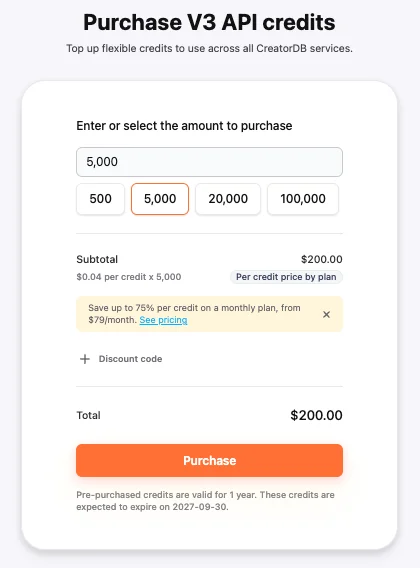
- Subscribers can now purchase API 3.0 credits directly from the API dashboard. Pre-purchased credits are valid for one year.
- View range now shows a creator’s median views alongside the minimum and maximum, so a single viral post doesn’t distort your sense of their typical performance. This is available in both the CreatorDB App and Creator Analytics by CreatorDB.

Improvements
- A redesigned left navigation bar in the CreatorDB App makes it easier to move between features.
- Creator profiles have a clearer layout and load faster in both the CreatorDB App and Creator Analytics by CreatorDB.
- Charts on creator profiles now resize properly on smaller screens, such as phones.
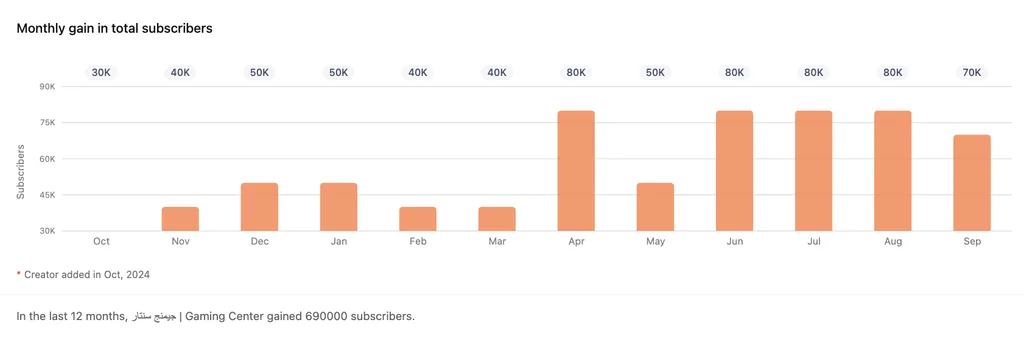
- The Upload Time heatmap and the Monthly gain in total followers chart now show data for each platform separately, instead of combining YouTube, Instagram, and TikTok into one view.
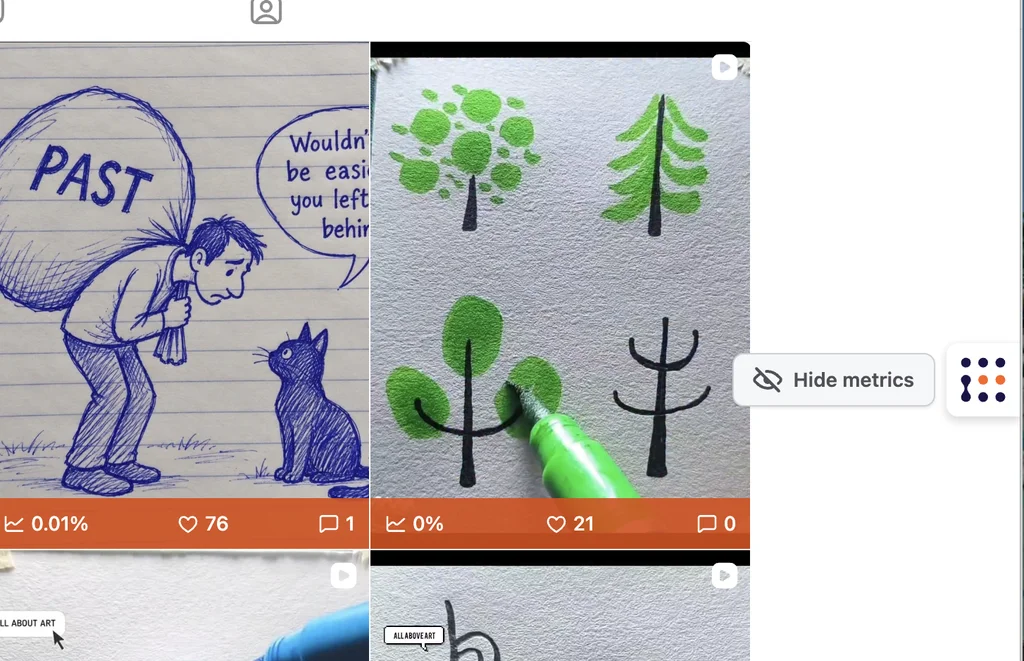
- You can now show or hide metrics in Creator Analytics by CreatorDB to view all creator content at a glance.
August 31, 2026
Developers can now manage API 3.0 keys from the API dashboard, connect AI agents to CreatorDB through a new MCP server, and estimate API costs before writing any code. Read the full release notes.
New Features
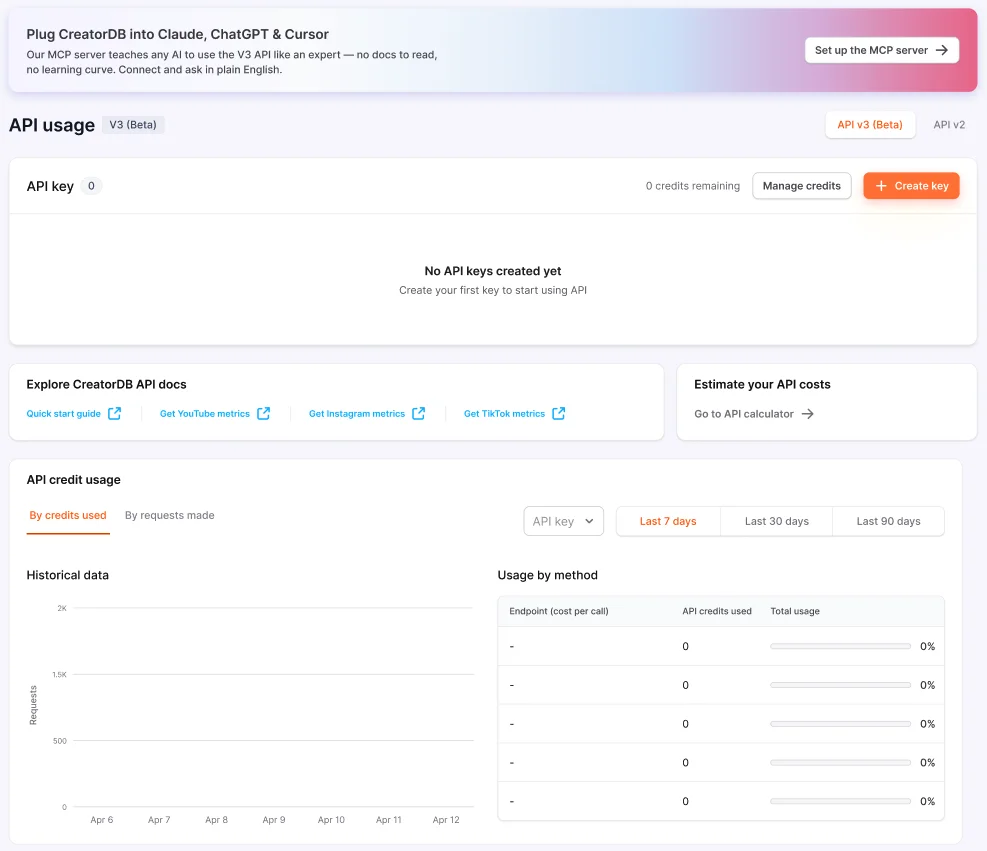
- Generate and manage API 3.0 keys directly from the API dashboard. You can view all your keys, create new ones, and track credit usage in one place.
- Set and reset a credit usage limit for each API key, and check its remaining balance without leaving the dashboard.
- Connect AI tools and agents to CreatorDB through the new CreatorDB MCP server, available via the API dashboard. MCP (Model Context Protocol) is an open standard that lets AI assistants query outside data sources, so assistants that support it can pull creator data directly into their workflows.
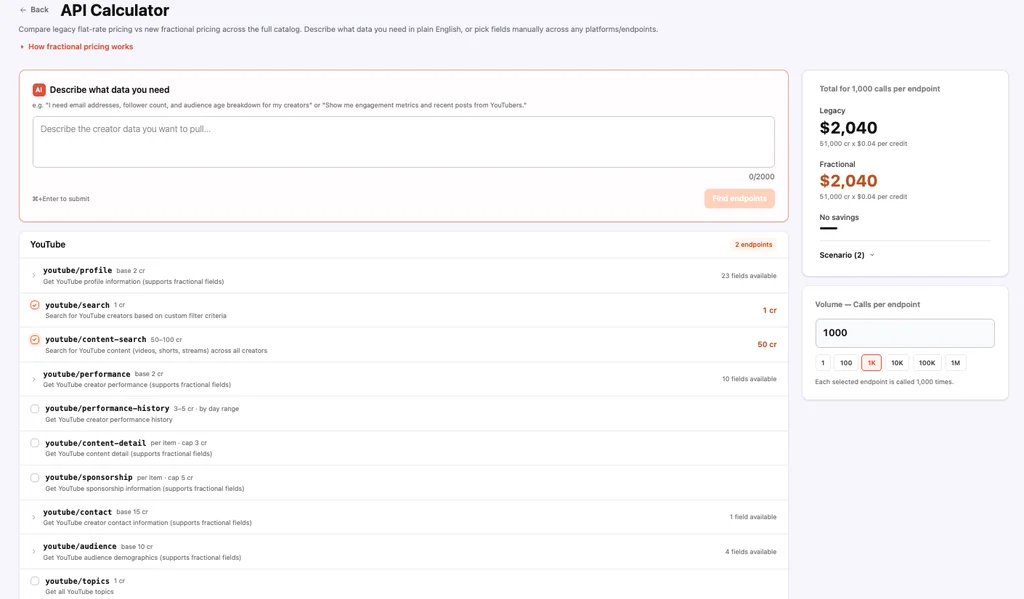
- Estimate what your API calls will cost with the new API Credits Calculator. Choose the endpoints you plan to call to see the cost at your plan’s per-credit rate.
July 29, 2026
Campaign setup got faster, clients can see every campaign they have access to in one list, and Instagram engagement rate is now readable without leaving Instagram. Read the full release notes.
New Features
- A new campaign brief layout that shortens the time it takes to complete a brief and reduces scrolling.
- Clients you invite to review a campaign can now view every client sheet they have access to in a single list, with campaign name, status, dates, budget, target audience, platforms, and more.
- A new Instagram engagement rate readout in Creator Analytics by CreatorDB, so you can assess a post’s performance without leaving Instagram.
Improvements
- The Total Followers chart on a creator profile can now break follower growth down by platform while keeping the total view.
- Creator profile metrics now lead with average views on YouTube, average likes on Instagram, and average plays on TikTok, each followed by engagement rate, then audience size. Time ranges are clearly labeled: 90, 30, and 7 days.
Bug Fixes
- Fixed inaccurate audience demographic data on Instagram and TikTok.
- Fixed Instagram post video length showing “0m 00s” when no duration existed. It now shows an empty state instead.
June 30, 2026
We launched Campaign Management, so you can run and manage influencer marketing campaigns inside CreatorDB. Read the full release notes.
New Features
- Campaign Management: create, edit, and manage campaign briefs, find and add creators to your campaign board, manage creator statuses, invite clients to review and approve proposals on the client sheet, and get performance metrics on partnered content.
- Toggle between content formats in the Content tab, switching between YouTube Videos or Shorts and Instagram Posts or Reels.
Improvements
- Time-constrained data now has clearly defined time ranges.
- Optimized CSV download time.
Bug Fixes
- Fixed the keyword filter.
April 10, 2026
New Features
Enjoy better creator insights and a new outreach tool that makes it easier to evaluate and connect with creators.
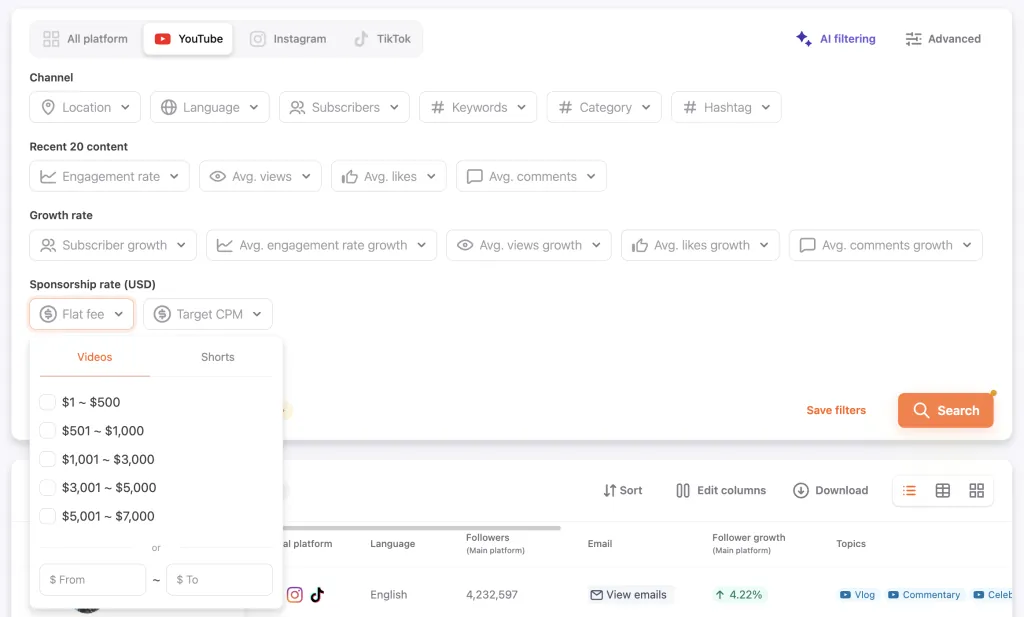
- You can now view a creator’s YouTube Sponsorship Rate in the CreatorDB App on their profile page and use it as a filter in Discover searches. This new feature is also available in our Chrome Extension, Creator Analytics by CreatorDB.

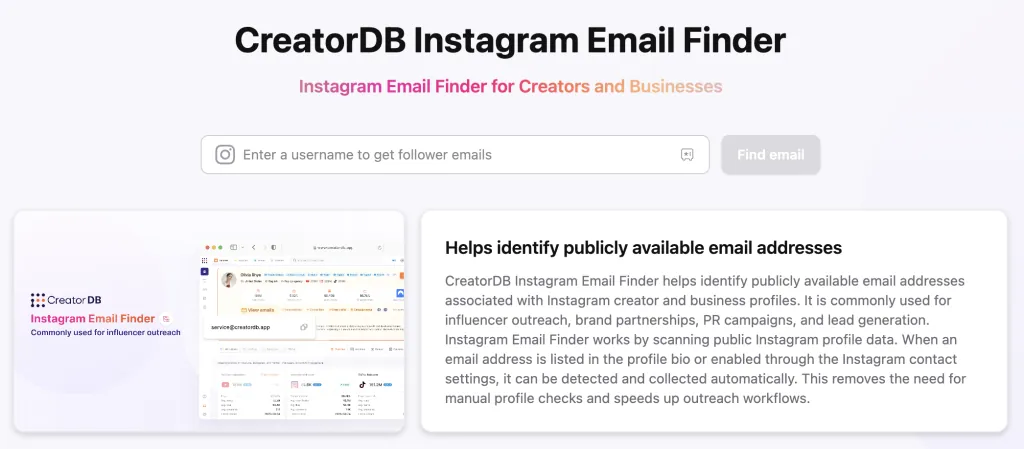
- Use our free, publicly available Instagram Email Finder to identify creator email addresses.
Improvements
- Related Channels are now platform-specific for more relevant recommendations.
Bug Fixes
- Fixed the incorrect redirection of logged-in users.
March 13th, 2026
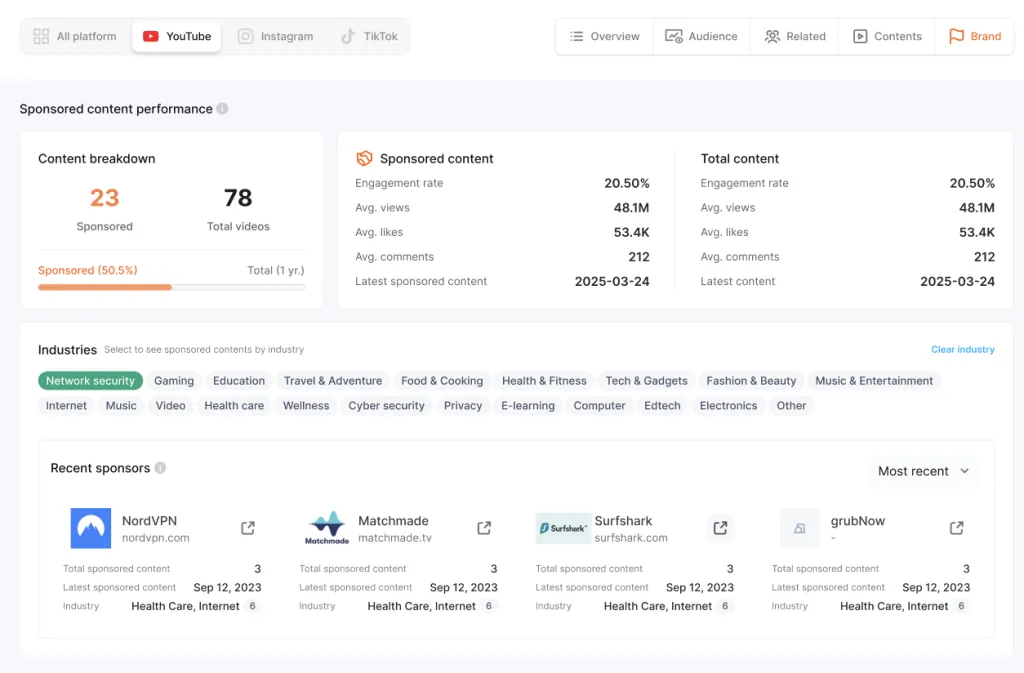
Enjoy an optimized YouTube brand tab that has more sponsored content data and industry filter options.
New Features
- Sponsored content can now be identified and filtered through YouTube > Brand on a creator profile page.
Improvements
- We’ve made the breakdown of pricing plans clearer on the pricing page.
- Optimized ranking and growth analytics.
Bug Fixes
- Fixed Group feature bugs.
January 21st, 2026
In this release, enjoy new features that can speed up filtering and contacting creators.
New Features
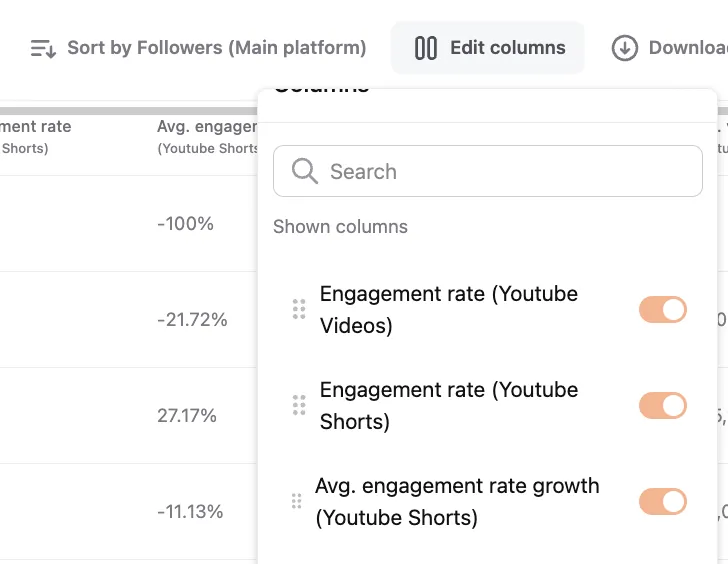
- Show and compare YouTube videos and shorts results in your Discover Search Results.
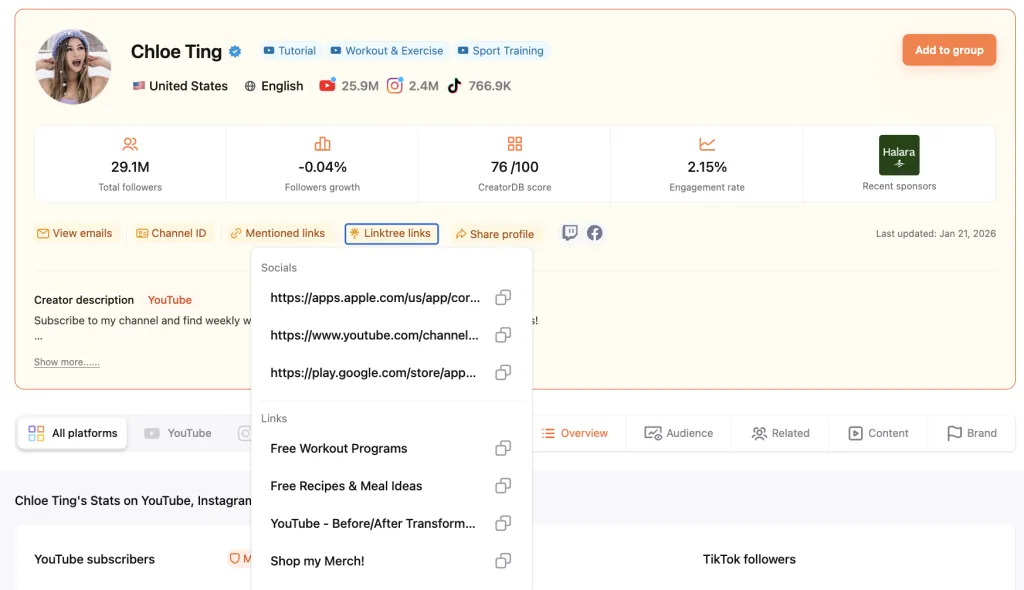
- Access a creator’s Linktree links through their Creator Profile.
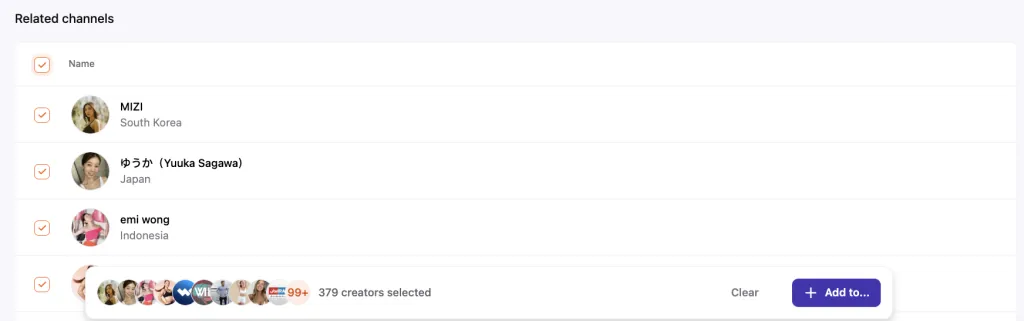
- You can now select all creators in the Related channels tab to quickly save similar creators to your Groups.
Improvements
- We’ve optimized the Views Range user interface.
Bug Fixes
- Fixed broken buttons.
December 15th, 2025
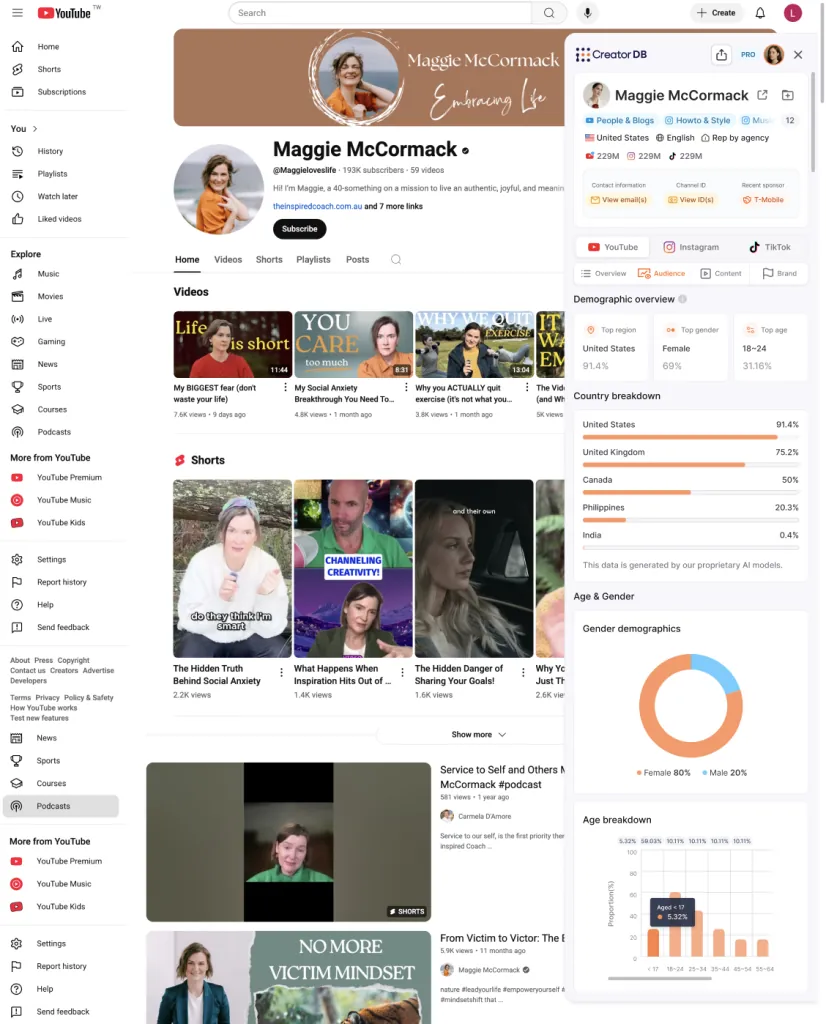
We’re excited to announce the launch of the new Creator Analytics by CreatorDB web browser tool. By installing this Chrome Extension, you can instantly access creator insights directly while browsing social media platforms.
You can download it here.
Creator Analytics by CreatorDB Features
- Use Creator Analytics by CreatorDB on YouTube, Instagram, or TikTok
- Quickly analyze creator metrics while browsing platforms without switching contexts
- All the important creator profile functions of the site are delivered to your open browser
CreatorDB Web Platform Release Notes
Improvements
- We’ve optimized search loading time for faster results
- You can now click on Topic and Niches badges in creator profiles to quickly filter a Discover search
Bug Fixes
- Fixed broken channel links
October 29th, 2025
We’ve launched a new data indicator, View range, to help you get creator view statistics at a glance.
New Features
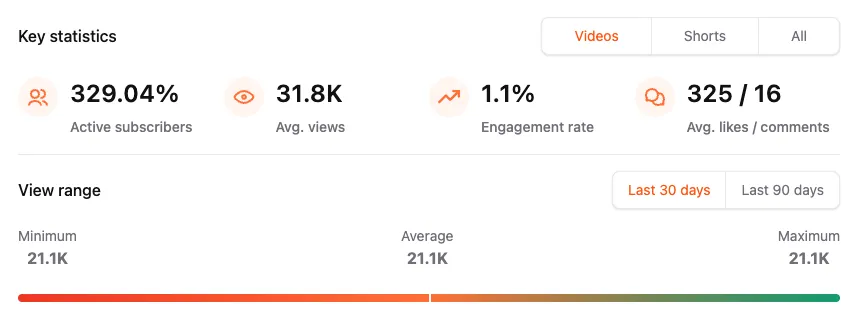
- View range
- See the minimum, average, and maximum views in the last 30 or 90 days
- Get views data from all social media platforms
- Only calculates views on content posted for more than 3 days for accurate representation
Improvement
- We’ve optimized the Discover page user interface to provide better user experience
- Updated page titles to reflect which platforms a creator is active on
What’s Next
- Brand scan optimizations and supporting CSV scan
- New web browser plug-in to be launched
September 19th, 2025
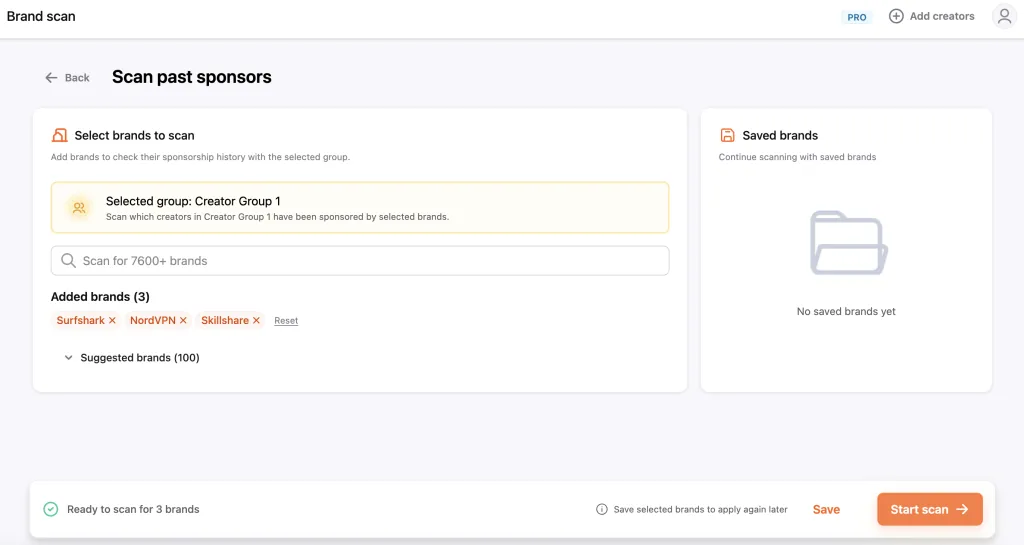
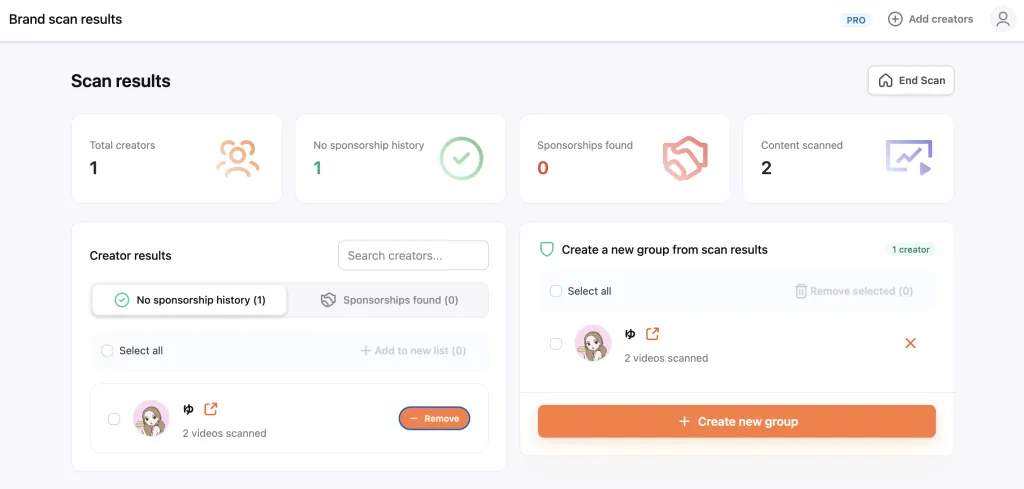
We’ve launched a new feature, Brand scan, that allows you to look up a creator’s past sponsorship details easily.
New Feature
- Brand scan
- Speed up the creator vetting process and save your results as a new Group
- Scan any of your creator Groups to see creators’ past sponsorships by brands of your choosing
- Identify how recently a creator has worked with specific brands
Improvement
- We’ve added more filters to the Instagram Discover page to help speed up your creator search process
- Graphs now support zoom in and out for a better user experience
- Improved and changed user interface wordings
Bug Fixes
- Fixed mobile version layouts
What’s Next
- New web browser plug-in for quicker access to database insights
August 28th, 2025
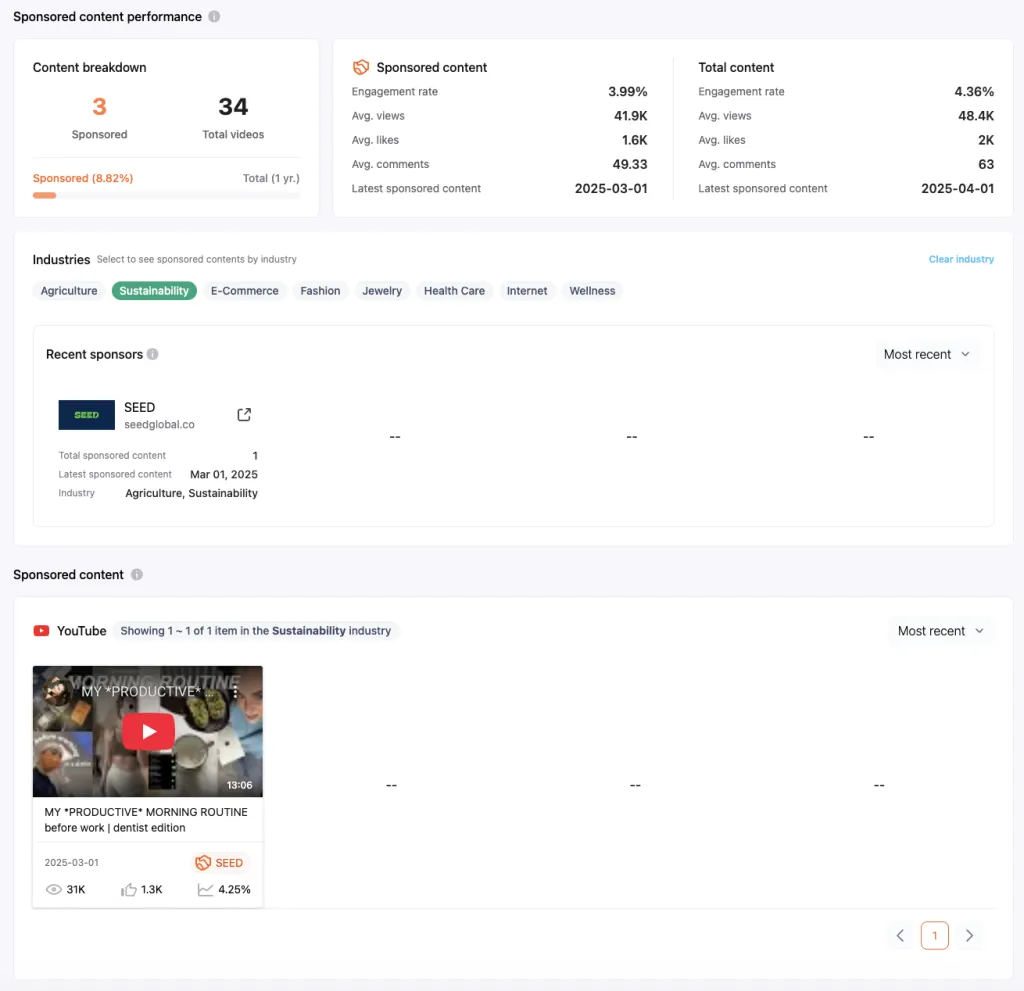
In this release, we’ve optimized the YouTube brand tab so you can filter a creator’s sponsorships by industry and brand.
New Feature
- New YouTube brand tab design
- Compare sponsored content to overall content performance
- Filter brands a creator has worked with by industry
- Filter sponsored content a creator has posted by industry or brand
Improvement
- Improved data summaries and user interface for a better user experience
Bug Fixes
- Fixed icon updates
- Fixed brand search feature
What’s Next
- New brand scan feature to verify a creator’s past sponsorships
- Browser plug-in for quicker access to database insights
August 8th, 2025
In this release, we’ve added new features and made several User Interface (UI) optimizations to help you find creators more easily.
New feature
- Added YouTube audience demographic filters
- Easily filter out creators by their relevant demographics
- Including age, gender, and location
Improvements
- Improved several user interface designs to help you easily navigate the app
Bug Fixes
- Fixed the views filter function
- Fixed CSV file format upload issue
What’s Next
- Browser plugin for quicker access to database insights
- See detailed data insights for brand collaborations on YouTube
July 16th, 2025
We’re excited to announce we’ve added more Instagram Reels data. With the new Reels data and filters, you can now better find your relevant creators on our platform.
- Instagram Reels data
- Easily filter creators by Instagram Post or Reels data now and differentiate each type of contents’ performance. Compare them side by side using the updated Search Results columns.
Improvements
- Optimized user experience
- Improved the user experience of several application flows for a smoother experience, including
- Filter user interface for better search result matches
- Plan management pages for easier account management
- Scroll function for easier usage
- Improved the user experience of several application flows for a smoother experience, including
Bug Fixes
- Fixed some broken links
- Removed any duplicated topics in creator profiles
June 5th, 2025
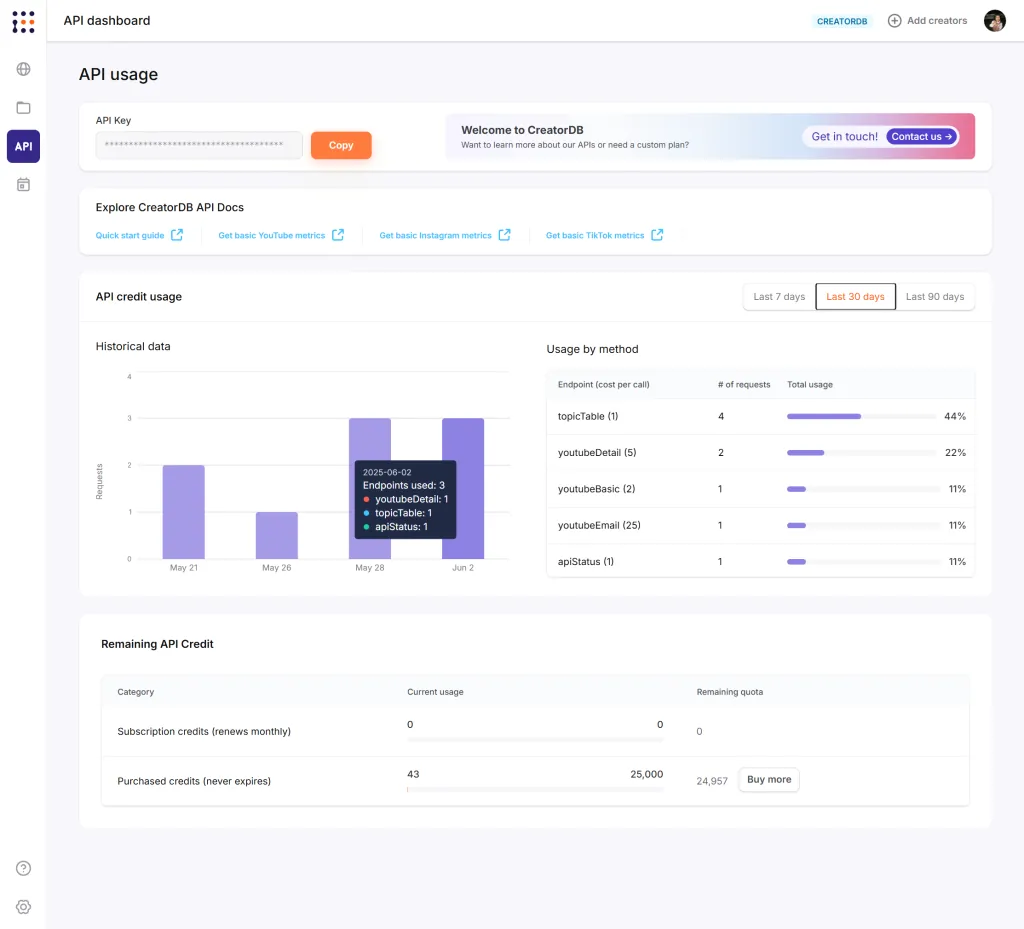
Through our new API dashboard, you can now better understand your API credits usage and related metrics. We’re also excited to announce you can now gain better brand insight into Instagram sponsored content on our platform.
New Features
- API Dashboard
- Introduced an API Dashboard to consolidate API related information, show API usage and API documentation links for easy access.
Content Search & Discovery
- Added YouTube demographic filters to Content Search for more targeted creator discovery.
- Introduced Instagram sponsored content matching with creators for comprehensive brand partnership insights.
- Enhanced search functionality to find creators using YouTube, Instagram, and TikTok hashtags.
In-App Experience
- Added Release Notes link to keep users informed of updates and improvements.
Improvements
- Data Accuracy & Display
- Improved data continuity – when latest platform data isn’t available, the system now carries over the most recent data instead of leaving gaps.
- Fixed country percentage data in audience demographics showing incorrect information.
Bug Fixes
- Fixed creator profile display problems.
- Fixed various display and functionality issues across the dashboards.
- Fixed trial cancellation issues and incorrect plan expiration dates.
What’s Next
- Include more data in the API Dashboard.
- Improvements to how sponsorship information is shown in the creator profile page.
- Usability and visualization improvements.
May 15th, 2025
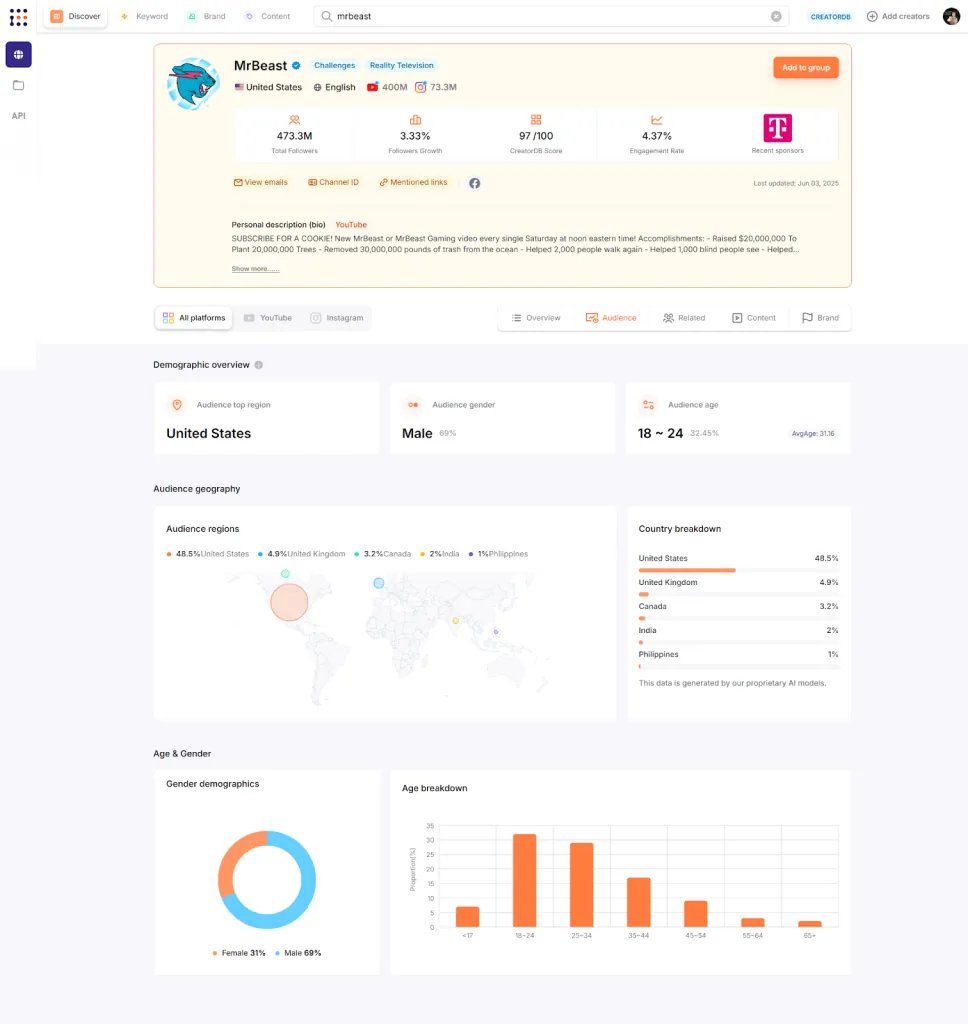
We’re excited to announce the availability of YouTube demographics data so you can get more comprehensive audience insights. We’ve also enhanced the search and filtering capabilities and improved data accuracy. For a smoother user experience, we’ve improved data display format and user interface.
New Features
Creator Profile
- Deployed YouTube audience demographics using our proprietary AI models for our APIs and dashboards.
Discover Search
- Added basic filters for creator country, language and other important criteria on the Content search page.
- Introduced “Date added” filter across all platforms to help find recently added creators.
Improvements
Search & Filtering
- Fixed keyword search logic to use “OR” operations for Keywords instead of “AND”. This change will improve search results by broadening the search scope.
- Enhanced filter accuracy for “YouTube: Has sponsored content” searches.
User Interface
- Updated “No email found” logic for more accurate display.
- Enhanced Account Quality gauges with updated data presentation.
Bug Fixes
- Fixed Instagram verified badge appearing incorrectly on accounts without Instagram.
- Resolved sponsored content video details not displaying correctly.
What’s Next
API dashboard with comprehensive usage tracking for our API users.
April 28th, 2025
Goals:
- Make it easier to identify active creators and their latest content
- Improve Discover Search usability and flexibility
- Make creator performance data clearer and easier to understand
New Features
- Creator Profile
- Displayed the latest content post date for each platform
- Added an ‘Active’ icon on the Creator Profile page to clearly see which platforms the creators have posted new content within 30 days
Improvements
- Discover Search
- Redesigned ‘Keywords’ layout to nest related keywords and allow for easy multi-select and organization
- Updated the search logic for the ‘Keywords’ to be ‘OR’ instead of ‘AND’ for broader discovery
- Improved drag-and-drop column management, including horizontal shifting
- ‘Cancel’ link for downloads more visible
- Creator Profile
- Added a label showing the creator’s main platform (where they have the most followers)
- Improved readability of 7-, 30-, and 90-day charts
- Included the date that CreatorDB last successfully scraped the creator’s data.
- General
- Made the ‘Cancel Plan’ button easier to find
Bug Fixes
- Fixed bug where filters could not be adjusted if they were applied through the related Topics from the Creator Profile page
- Removed TikTok as a filter in our brands page
What’s Next:
- Audience demographics for YouTube
- API dashboard to track usage and consolidate all API related info
- Public creator profiles for easy sharing of creator performance metrics
- Sponsorship insights for Instagram content
Work with CreatorDB
Put this into
practice.
Talk to our Asia agency team about applying these ideas to a real creator campaign — or open the CreatorDB app and start building your shortlist now.
Frequently Asked Questions.
What new creator metrics can I view in CreatorDB's app?
CreatorDB now displays YouTube Sponsorship Rate on creator profile pages, filterable in Discover searches and the Chrome Extension. You can also view minimum, average, and maximum views across platforms for the last 30 or 90 days via the new View Range indicator. Additionally, sponsored content on YouTube is now identifiable and filterable, and creator Linktree links are accessible directly from profiles.
How do I use CreatorDB's Chrome Extension for creator research?
Creator Analytics by CreatorDB installs as a browser extension to analyze creator metrics on YouTube, Instagram, or TikTok without leaving the platform. Once installed, you access creator insights, profile functions, and data points directly while browsing—eliminating the need to switch between tabs or applications.
What is Brand Scan and how does it speed up creator vetting?
Brand Scan lets you search a creator's past sponsorship history by specific brands and see how recently they've partnered with competitors. You scan entire creator Groups at once, save results as new Groups, and identify sponsorship patterns—accelerating the vetting process when shortlisting creators for campaigns.
Can I find creator email addresses through CreatorDB?
CreatorDB's free Instagram Email Finder identifies creator email addresses publicly available on Instagram profiles. This tool streamlines outreach by eliminating manual research; you can then contact shortlisted creators directly without external lookup services.
How does CreatorDB organize related creator recommendations?
Related Channels recommendations are now platform-specific, delivering more relevant creator suggestions based on the platform you're researching. This ensures recommendations align with the audience and content type you're targeting rather than generic cross-platform matches.