Free Influencer Analytics Chrome Extension

Creator Data, on the Page
You're Already Looking At

Creator Analytics by CreatorDB is a free influencer analytics Chrome extension that puts engagement rate, audience splits, sponsorship history and contact details in a side panel on YouTube, Instagram and TikTok. You are on the creator's page already. Stop opening a second tab to find out if they are worth a message.

Add to Chrome (Free) → See What's in the Panel

Free to install · Signs in with your CreatorDB account · YouTube, Instagram, TikTok

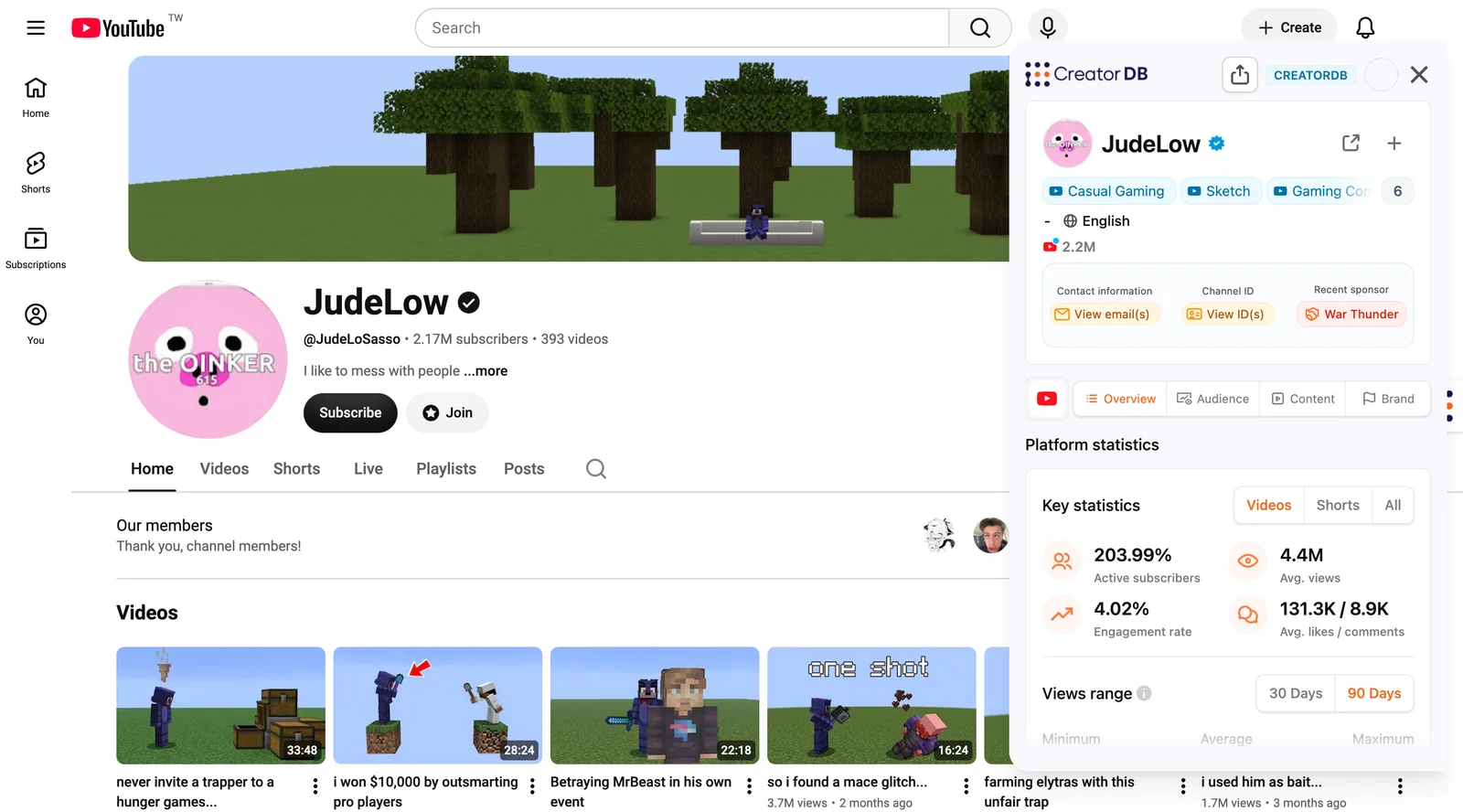
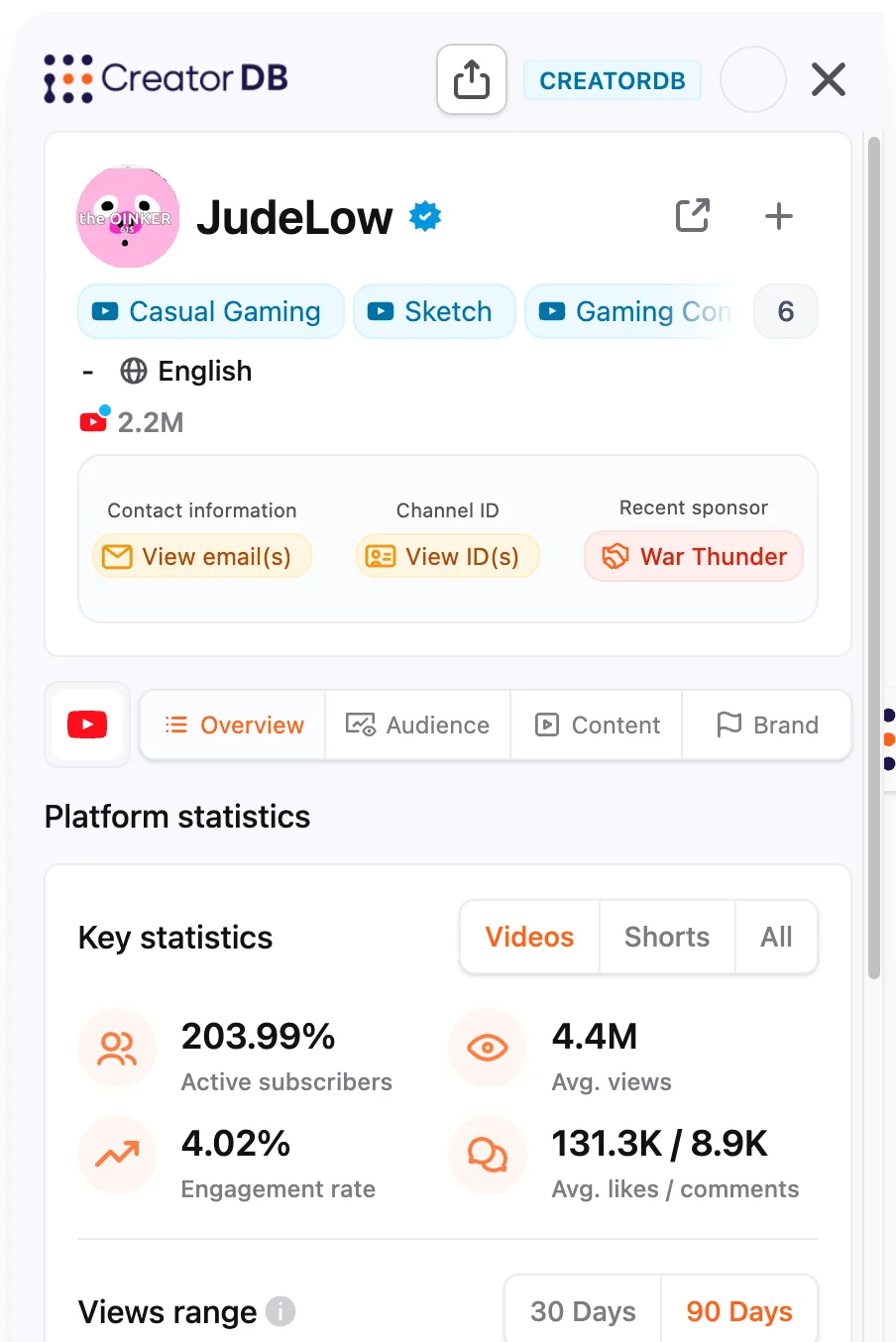
The CreatorDB panel open over the JudeLow YouTube channel, showing 2.2M subscribers, contact and channel ID buttons, recent sponsor War Thunder, and key statistics including a 4.02 percent engagement rate and 4.4M average views

What's in the panel

Four Tabs. Everything You'd Open a Tool For.

One panel, opened over the page you are on, with the creator already loaded. No handle to paste, no search to run.

Overview

Active subscriber share, engagement rate, average views, average likes and comments: the figures that separate real reach from a follower count.

Audience

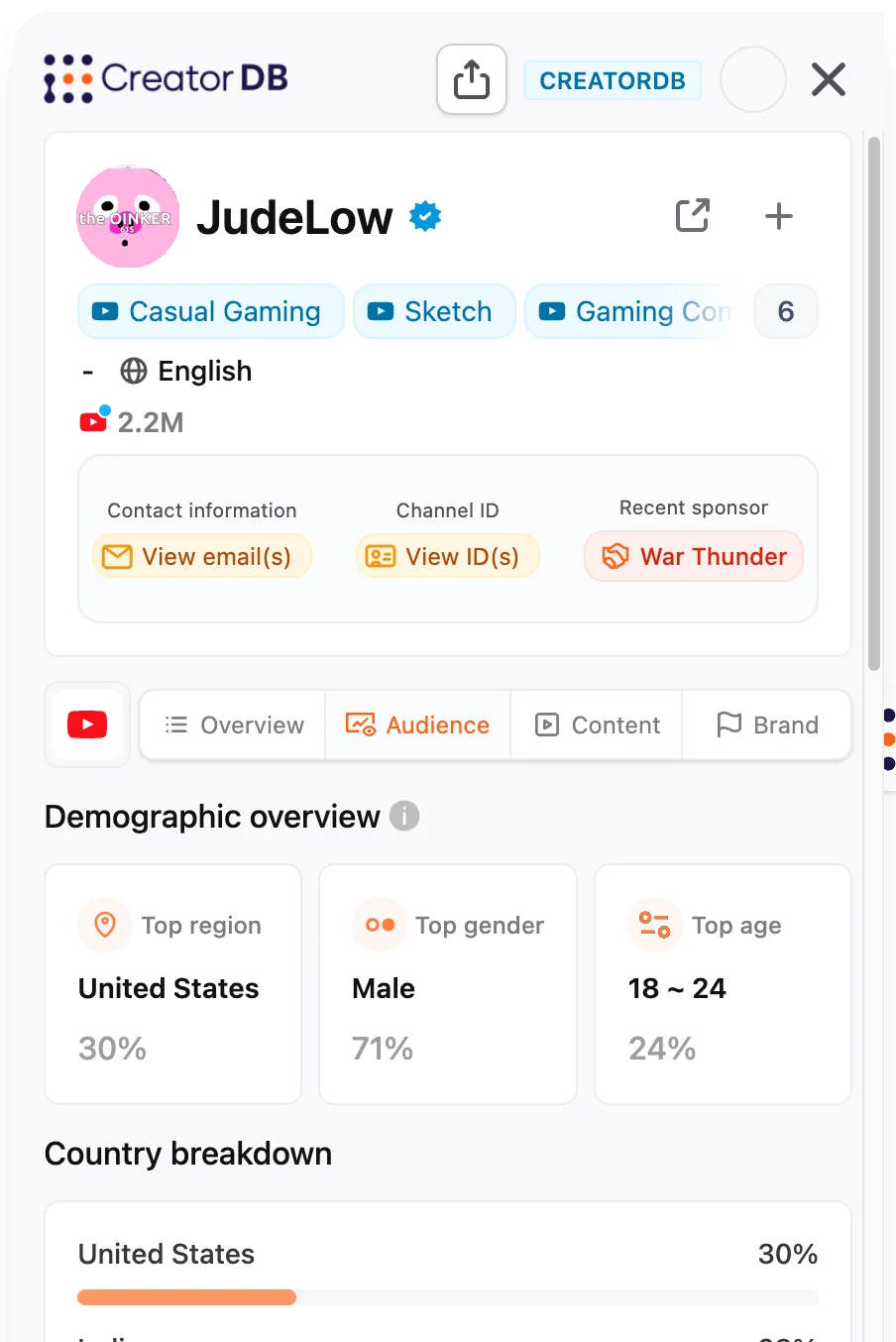
Country breakdown with a share for each, plus gender and age splits. JudeLow's audience, for instance, is only 30% US (28% is in India), which changes who a campaign should actually target.

Content

Recent posts with views, likes and engagement on each, and which ones were sponsored, plus the hashtags, topics and niches they keep returning to.

Brand

How much of their output is sponsored, what that does to their engagement, and every brand that has paid them, sorted by recency or volume, filtered by industry.

Audience tab for JudeLow: top region United States 30 percent, top gender male 71 percent, top age 18 to 24 at 24 percent, with India and Mexico next in the country breakdown
Audience: country, gender and age splits, inferred by CreatorDB's models.

Sponsorship History

Know Who Has Already Paid Them.

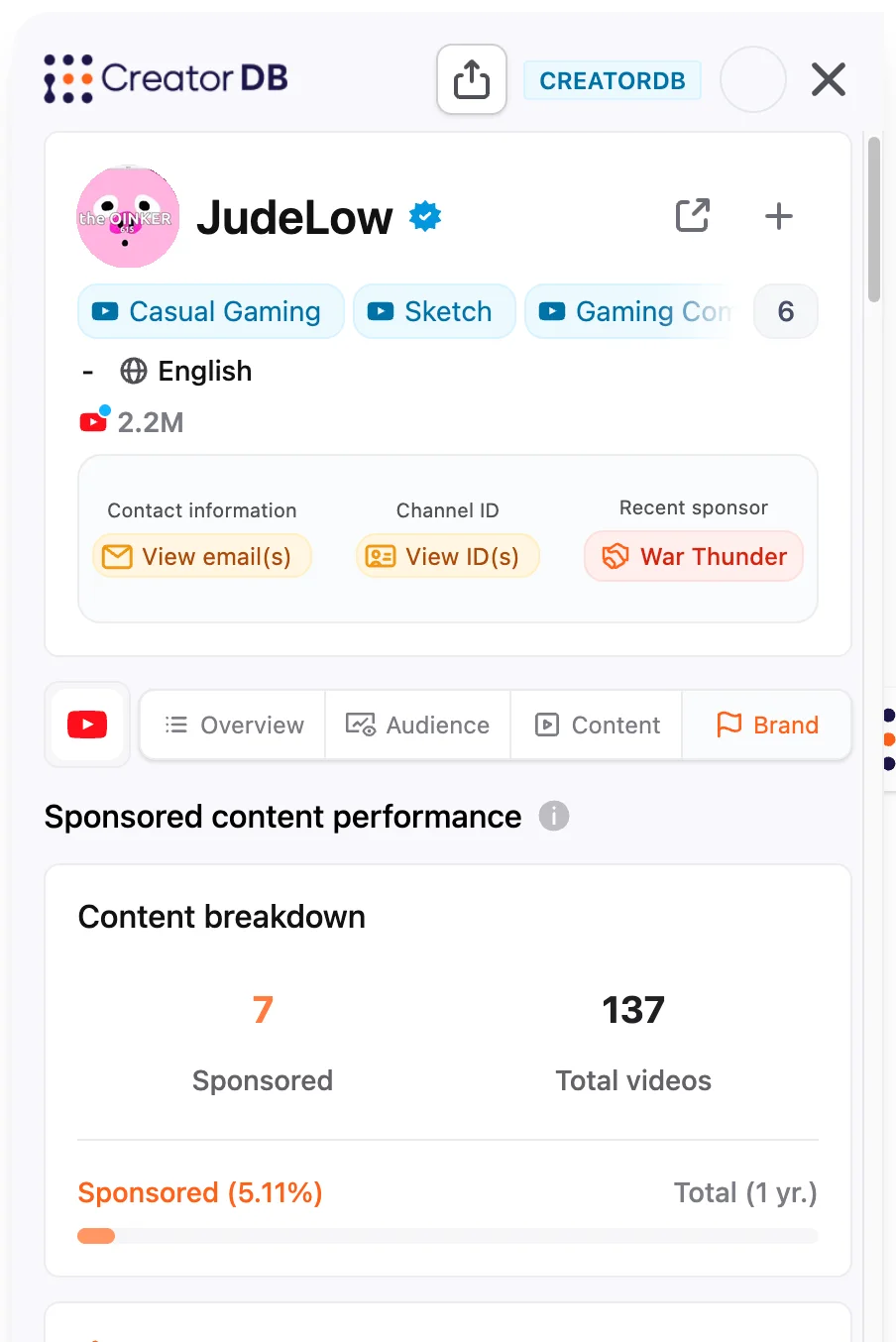
The Brand tab is the one that changes a negotiation. It counts the sponsored content a creator has run, and sets it against how their sponsored posts perform next to their organic ones, so you can see whether an ad dents their engagement before you book one.

Underneath it, the brands themselves: who they worked with, how many pieces of content, how recently, and in which industry. You find out a competitor already ran a campaign with this creator before you make an offer, not after.

Brand tab for JudeLow showing sponsored content performance, a content breakdown, and the sponsored-versus-organic engagement comparison, with War Thunder as a recent sponsor
Brand: sponsored-vs-organic performance, plus every brand that has paid them.

What they cost

Walk In With a Number.

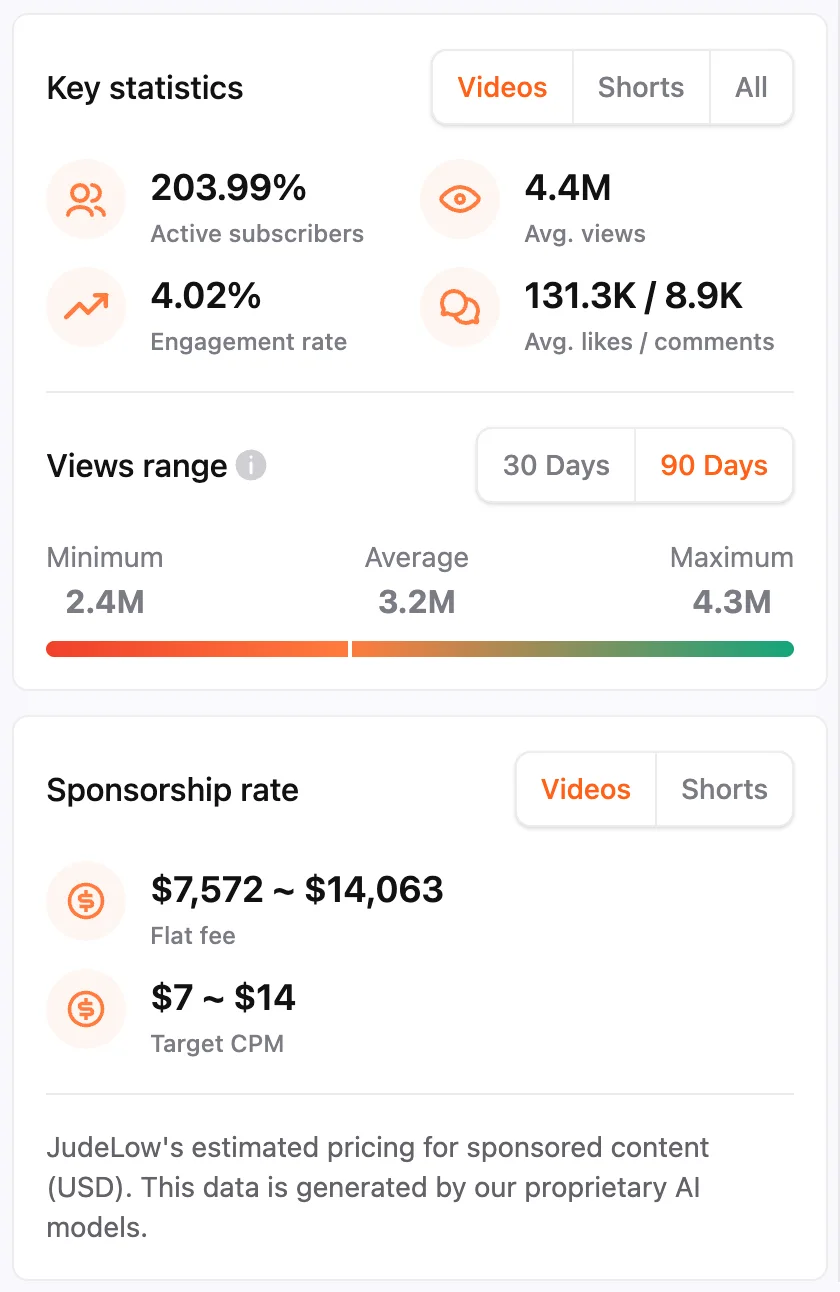
The Overview tab carries an estimated price for sponsored content: a flat-fee range and a target CPM, generated by CreatorDB's models from the creator's real reach. For JudeLow that reads $7,572 to $14,063 flat, at a $7 to $14 target CPM.

Knowing the market rate before the first email is the difference between negotiating and reacting to whatever number comes back. It is an estimate, and the panel says so, but an estimate anchored in views beats no anchor at all.

Overview tab showing a sponsorship rate estimate of $7,572 to $14,063 flat fee and a $7 to $14 target CPM, alongside a views range of 2.4M minimum, 3.2M average and 4.3M maximum
Estimated sponsorship pricing, plus the 30- and 90-day views range.

Cross-platform

One Creator, All Their Accounts, One Panel.

Most extensions read the page they are on. This one resolves the creator behind it. Open the panel on a YouTube channel and their Instagram and TikTok are tabs in the same view, each with its own metrics, audience and sponsor history.

That matters when you price a deal. A creator with millions on YouTube but a fraction of that on TikTok is a different conversation depending on where the campaign runs, and not something you should have to search two more platforms by hand to learn.

The panel header showing one creator's YouTube, Instagram and TikTok follower counts side by side, with platform tabs beneath

Use cases

Four Moments It Earns Its Keep

Marketer

Qualifying a Shortlist Without Forty Tabs

You have twenty candidate creators from a search or a competitor's feed. Nineteen of them will not survive contact with their real engagement rate and audience geography.

Open the panel on each. Disqualify in seconds, not in a spreadsheet.

Brand manager

Checking a Creator Before You Name a Price

A creator whose sponsored posts pull lower engagement than their organic ones is worth a different number than one whose audience does not flinch at an ad.

Read the sponsored rate and the brand list before the first call.

Agency

Vetting Inbound Pitches at Speed

Creators pitch you daily. Most of the work is deciding which ones are real, and doing it fast enough that the good ones don't go cold waiting on you.

Open their profile, open the panel, reply the same day.

Anyone doing outreach

Going From "Yes" to Sent

You have decided. Now the slow part starts: hunting for a contact email through a bio, an About tab and a link-in-bio page, for every creator on the list.

The contact email sits in the same panel as the numbers.

How it works

Three Steps, Then It's Just There.

1. Install From the Chrome Web Store

Free to add. Sign in with your CreatorDB account.

2. Browse as Normal

Go to any creator on YouTube, Instagram or TikTok. Nothing changes about how you work.

3. Open the Panel

Metrics, audience, content and sponsorship history load for whoever's page you're on.

Built On

The Same Database, One Surface Closer.

The panel is a window onto the creator database that powers the CreatorDB app and the Data API: 30M+ profiles across YouTube, Instagram and TikTok, refreshed almost daily.

Nothing you see while browsing is a lighter version of the real thing. It is the real thing, shown where you happen to be standing. When you want the full profile, open it in the app.

Open the App →

Frequently Asked Questions

What it costs, what it can see, and where the numbers come from.

What does the extension cost?

The extension itself is free to add from the Chrome Web Store. It signs in with your CreatorDB account, and how much data you can pull follows your plan, the same as it does in the app.

Which platforms does it work on?

YouTube, Instagram and TikTok.

Do I need a CreatorDB account?

Yes. The panel signs in with your CreatorDB account, which is what connects it to the creator database behind it.

Does it work on every creator?

It works on creators in the CreatorDB index, which covers 30M+ profiles across the three platforms. Very small or very new accounts may not be indexed yet.

Where does the audience data come from?

Audience splits are inferred by CreatorDB's own models rather than reported by the platforms, and the panel labels them as such.

Is this the same data as the web app?

Yes. The extension is another surface on the same creator database, so what you see while browsing matches what you would find in the app.

Which browsers are supported?

Chrome, via the Chrome Web Store.

How do I send feedback?

Email sales@creatordb.app. The extension is actively developed: YouTube sponsorship rate and Instagram engagement readouts were both added after launch.

More Free CreatorDB Tools

Stop Opening a Second Tab.

Install once, and every creator page you visit comes with the data you would have gone looking for.

Add to Chrome (Free) →